Complete Import & Export Management for WordPress and WooCommerce
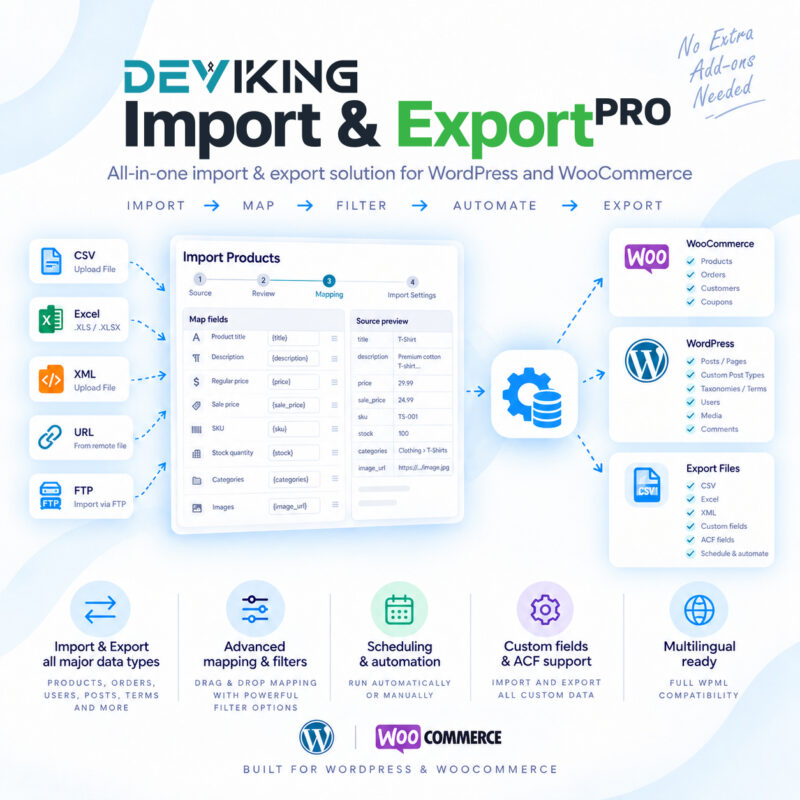
Deviking Import & Export Pro gives you full control over your WordPress and WooCommerce data through a powerful, structured and easy-to-manage import and export workflow.
Whether you are migrating a store, synchronizing external data, updating thousands of products, transferring custom content or building repeatable data workflows, Deviking Import & Export Pro provides the tools needed to handle complex datasets without relying on manual editing.
The plugin supports both standard WordPress data and advanced WooCommerce structures, while keeping Import and Export workflows separate, organized and reusable.
Import Almost Any WordPress or WooCommerce Data
Create advanced imports for:
- WooCommerce Products and Variations
- WooCommerce Orders
- Customers and WordPress Users
- WooCommerce Coupons
- WordPress Posts
- Pages
- Custom Post Types
- Taxonomies and Terms
- Media and Attachments
- WordPress Comments
- WooCommerce Product Reviews
- Custom Fields and Metadata
- Advanced Custom Fields
- WPML multilingual content
- Third-party content structures and relationships
Import data from:
- CSV
- Delimited text files
- XML
- JSON
- XLSX
- Uploaded files
- Remote URLs
- FTP sources
Visual Field Mapping
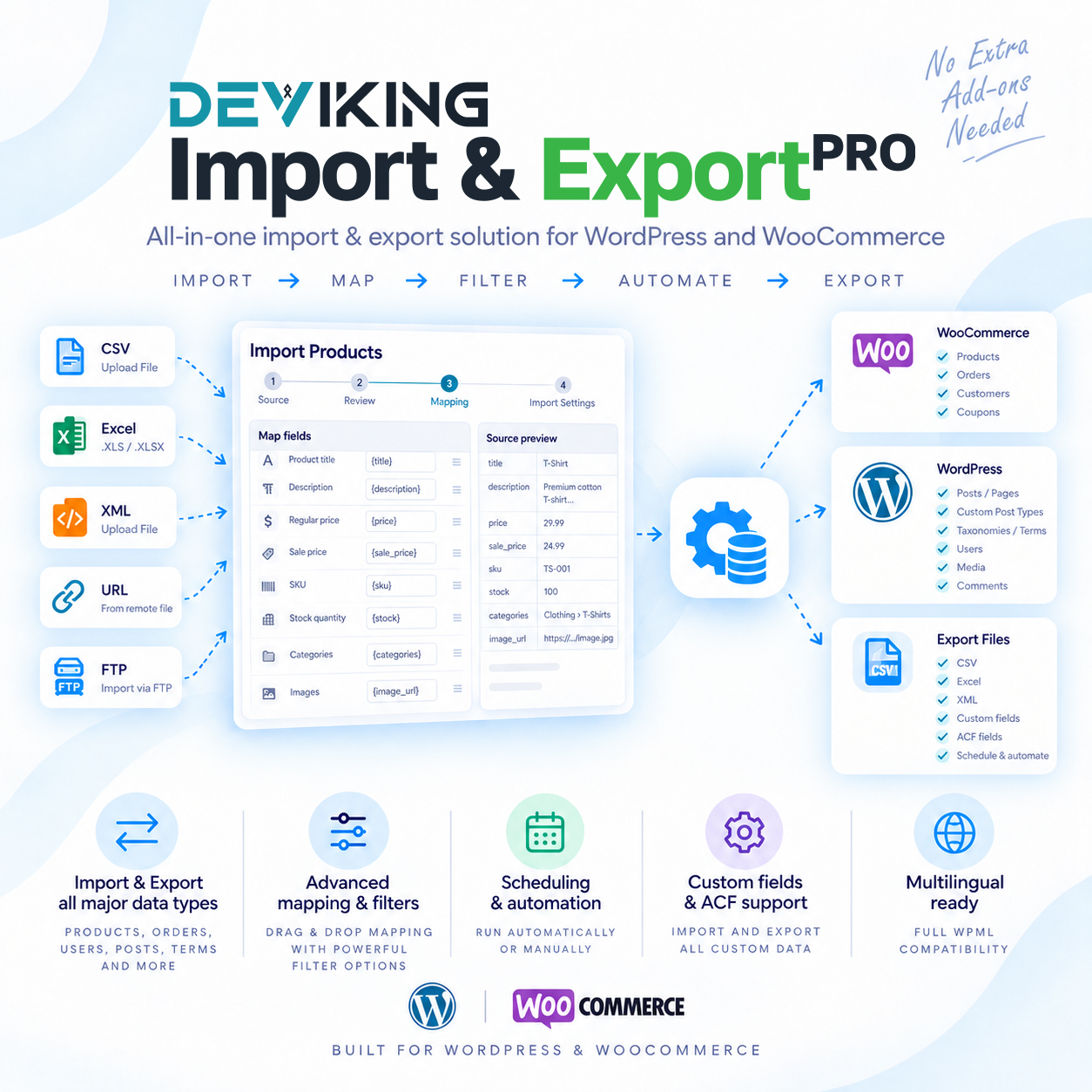
Map source data directly to WordPress and WooCommerce fields using an intuitive visual mapping interface.
Source values can be dragged into the required fields, combined with static content or configured through advanced mapping controls.
The source preview remains available while configuring the import, allowing you to see the actual data being mapped for the current record.
Advanced Product Import
Import simple, variable, grouped and external products with support for detailed WooCommerce product data including:
- Product titles and descriptions
- Regular and sale prices
- SKUs and identifiers
- Stock quantities and stock status
- Product dimensions and weight
- Shipping classes
- Upsells and cross-sells
- Attributes
- Variations
- Product images and galleries
- Categories
- Tags
- Custom product taxonomies
- Downloadable product data
- Advanced product options
- Custom fields
- ACF fields
- WPML language relationships
Hierarchical categories and taxonomies can be recreated automatically from source data.
Powerful Matching and Update Rules
Choose how imported records should interact with existing WordPress data.
Records can be matched using identifiers such as:
- ID
- SKU
- Title
- Custom Fields
- Unique identifiers
- Object-specific matching fields
You can choose whether matching records should be updated, skipped or selectively modified.
Selective update controls allow you to update only specific groups of fields while leaving existing data untouched.
This makes the plugin suitable not only for migrations, but also for recurring catalogue updates and synchronization workflows.
Filters Before Import
Use Include and Exclude filters to decide which records should be processed.
Create multiple conditions and combine them with logical rules to handle large source files without modifying the original data.
Background Processing
Large imports run through background processing instead of requiring the browser window to remain open.
Import progress includes live counters for:
- Created
- Updated
- Skipped
- Errors
You can leave the import page while processing continues and monitor progress later from Manage Imports.
Imports can also be stopped and resumed when necessary.
Detailed Import Logs
Every import can generate detailed record-level logs.
Logs can include:
- Source row information
- Created records
- Updated records
- Skipped records
- Filtered records
- Errors
- Object IDs
- Relevant identifiers
- Error and skip reasons
Logs can be downloaded for troubleshooting, auditing and migration verification.
Reusable Import Templates
Save your field mappings and import configuration as reusable templates.
Templates make it easy to repeat the same import structure without rebuilding mappings every time.
Import templates can also be exported and transferred between WordPress installations.
Flexible Export Builder
Create customized exports using a dedicated three-step workflow:
- Setup
- Customize
- Export Settings
Choose exactly which fields should be included and arrange them in the required order.
Export formats include:
Exports can include standard fields as well as:
- Custom fields
- Metadata
- ACF fields
- Taxonomies
- Hierarchy paths
- Product data
- Order data
- User data
- Relationship data
- Third-party registered fields
Advanced Taxonomy Support
Deviking Import & Export Pro supports both standard and custom WordPress taxonomies.
Import and export:
- Categories
- Tags
- Hierarchical taxonomies
- Custom taxonomies
- Parent/child structures
- Complete hierarchy paths
- Term metadata
Hierarchical data can be recreated automatically during migration.
Third-Party Content Structures
The plugin includes a generic relationship architecture designed for WordPress plugins that use custom hierarchical structures.
This allows compatible content models such as:
Root Entity → Child Entity → Content
to be imported and exported without forcing them into a generic category structure.
The provider architecture also allows third-party integrations to initialize plugin-specific entity data where required.
Custom Fields and Metadata
Import and export WordPress metadata across supported object types.
Existing meta keys can be discovered automatically, while custom keys can also be entered manually.
Private and registered metadata can be handled where supported.
Advanced Custom Fields Support
When ACF is installed, Deviking Import & Export Pro can work directly with ACF Field Groups.
Supported field mappings can include:
- Text
- Textarea
- Number
- Range
- Email
- URL
- Select
- Checkbox
- Radio
- True / False
- Date fields
- Image fields
- File fields
- Relationship fields
- Google Maps
- oEmbed
- Other supported ACF field types
ACF fields can also participate in selective update workflows.
WPML Integration
Import multilingual WordPress and WooCommerce content with WPML integration.
Configure:
- Content language
- Source language
- Translation relationships
- Translation groups
- Parent import relationships
Exports can also be filtered by language.
Scheduling
Imports and exports can be configured for scheduled execution.
Available scheduling options can include recurring intervals such as:
- Hourly
- Daily
- Weekly
- Monthly
Timezone-aware scheduling helps ensure jobs run according to the required website or business timezone.
Built for Large and Repeatable Workflows
Deviking Import & Export Pro is designed for both one-time migrations and ongoing data operations.
Use it for:
- Store migrations
- Product catalogue updates
- Supplier feed imports
- Bulk product maintenance
- Customer migrations
- Order migrations
- Content migrations
- Website restructuring
- Custom post type transfers
- Taxonomy migrations
- Multilingual migrations
- Repeating scheduled imports and exports
One Plugin for Complete Data Control
Instead of using separate tools for products, orders, users, content and taxonomies, Deviking Import & Export Pro provides one unified environment for managing WordPress and WooCommerce data.
Build the workflow once, save it as a template and reuse it whenever your data needs to move, update or synchronize.