Take full control of your WooCommerce checkout with Deviking Checkout Fields.
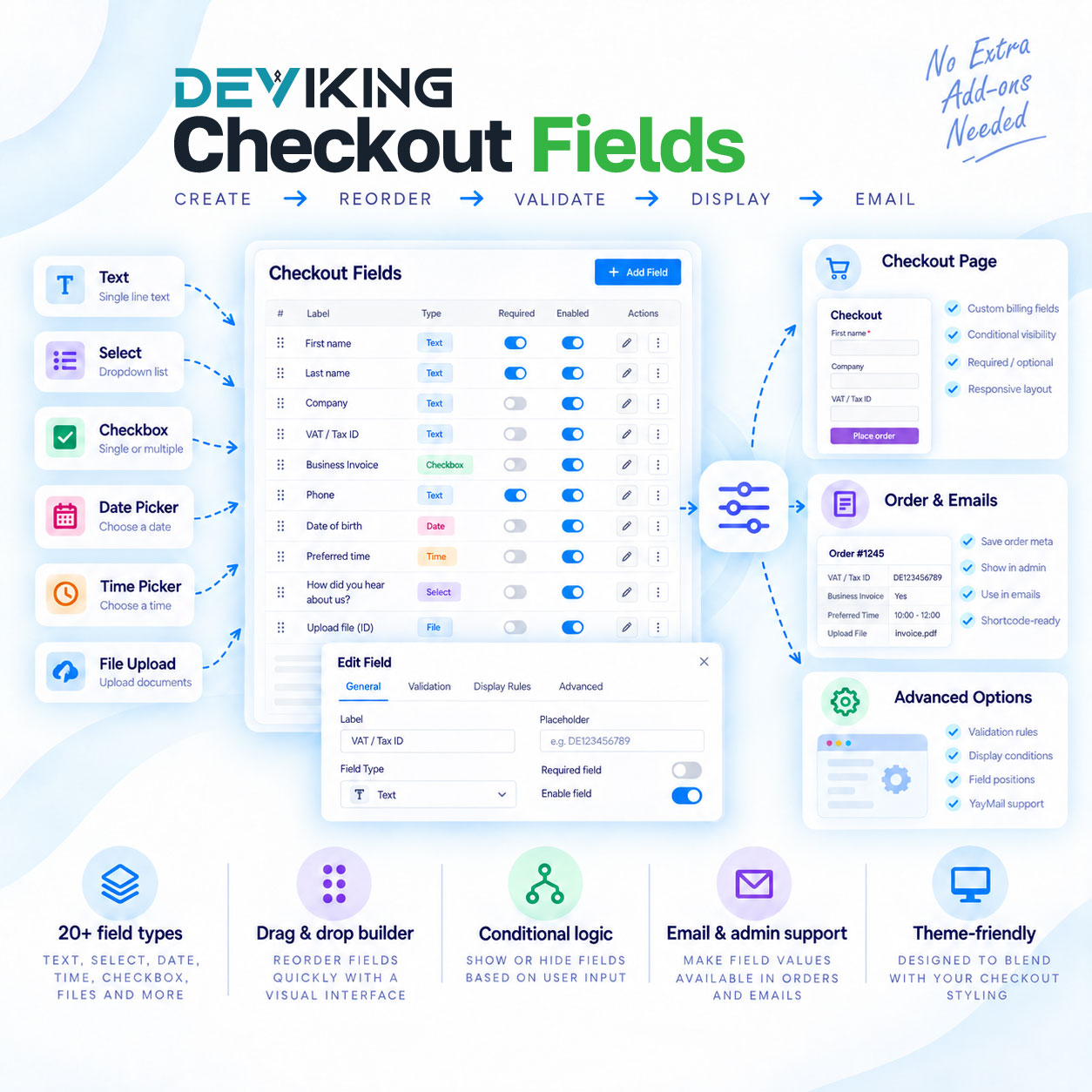
Create, edit, reorder, disable and customize checkout fields without replacing the native WooCommerce checkout. Manage Billing, Shipping and Additional fields from one clean interface, add advanced custom field types, apply conditional display rules, collect VAT and Tax IDs, control field visibility in orders and emails, and integrate custom checkout data into your existing workflow.
Deviking Checkout Fields is designed to work with both WooCommerce Classic Checkout and Checkout Block, while keeping custom fields visually consistent with the active theme.
Complete Checkout Field Management
Manage existing WooCommerce fields or create your own custom fields with full control over:
- Field type
- Label
- Field key
- Placeholder
- Default value
- Required status
- Field width and position
- Display conditions
- Pricing and taxable fees
- Admin and customer visibility
- Shortcodes
- Email output
Fields can be reordered with drag and drop and temporarily disabled without deleting their configuration.
20+ Field Types
Create the exact checkout experience your store requires with support for:
- Text
- Select
- Checkbox
- Textarea
- Email
- Phone
- VAT / Tax Number
- Number
- Radio
- Date Picker
- Time Picker
- Country
- State
- Multiselect
- Multicheckbox
- Password
- Message
- Heading
- Button
- File Upload
- Color Picker
Each field type includes controls specifically designed for its purpose instead of using the same generic settings for every field.
Advanced Conditional Logic
Show or hide fields dynamically according to customer input.
For example, you can display additional business information only when a customer requests an invoice, show a field based on the selected country, or reveal additional questions depending on another checkout selection.
Fields can also be shown or hidden according to:
- User roles
- Products in the cart
- Product categories
- Other checkout field values
VAT & Tax Number Validation
Add a dedicated VAT / Tax Number field for international business customers.
The field supports:
- Full tax numbers
- Automatic country prefixes
- Flexible number entry
- Billing or Shipping country as the country source
- EU VIES validation where supported
- Global tax-number collection for non-VIES countries
- Invalid-number blocking
- Country-prefix validation
- WooCommerce tax-exemption handling
Tax validation and tax removal can be configured independently, giving you precise control over how valid or entered tax numbers affect checkout totals.
OSS & IOSS Support
Configure advanced EU tax workflows directly from the plugin.
OSS and IOSS options include:
- Destination-country tax handling
- Store-country VAT handling
- WooCommerce tax-rate integration
- IOSS number storage
- Configurable IOSS goods-value limit
- Currency conversion for non-EUR stores
- Over-limit checkout behavior
- Customer-facing IOSS notices
Field-Based Fees
Turn checkout choices into paid options.
Add a fee to a field and choose whether the fee should be taxable. This is ideal for services such as:
- Priority processing
- Gift wrapping
- Special handling
- Premium delivery options
- Additional services
Control Where Field Values Appear
Choose exactly where custom checkout data should be displayed.
Global settings and per-field overrides are available for:
- WooCommerce admin orders
- Customer emails
- Admin emails
- Thank you page
- My Account order details
Each field can use the global setting or override it with Always show or Never show.
Universal Shortcodes
Every field includes a copy-ready shortcode that can be reused in supported WordPress and WooCommerce contexts.
Example:
A dedicated value shortcode is also available when you only need the stored value.
When YayMail is active, Checkout Fields automatically displays a second YayMail-compatible shortcode directly next to the field, ready to copy and paste into the email editor.
Classic Checkout & Checkout Block
Use the same field configuration across both WooCommerce checkout systems.
Deviking Checkout Fields supports:
- WooCommerce Classic Checkout
- WooCommerce Checkout Block
- Store API-compatible field handling
- Dynamic Block re-renders
- Native address-field behavior
- Responsive layouts
Custom fields are designed to inherit the active theme’s checkout styling wherever possible instead of forcing a separate plugin design.
Built for Real WooCommerce Stores
Deviking Checkout Fields combines checkout customization, conditional fields, tax handling, field fees, email integration, shortcodes and advanced output controls in a single plugin.
No separate checkout-field extensions are required for the core functionality.
One plugin. Complete checkout field control.