

How to Deactivate Your Deviking Product Feeds Pro License
You can deactivate your Deviking Product Feeds Pro license directly from the WordPress dashboard.
Deactivation removes the current site activation from the license without deleting the license itself.
Deactivate the License
- Log in to your WordPress administration area.
Go to:
Deviking Feeds → License
- Click Deactivate License.
- Confirm the action if requested.
Once deactivated, the current WordPress installation will no longer count as an active installation for that license.
What Happens After Deactivation?
After deactivation:
- the license key remains valid;
- the current site activation is removed;
- Pro functionality becomes unavailable on that installation until the license is activated again;
- protected updates are no longer available on that installation while the license is inactive;
- your existing feeds and plugin settings are not deleted.
If you activate the license again, your existing configuration remains available.
Changing the Activation Domain
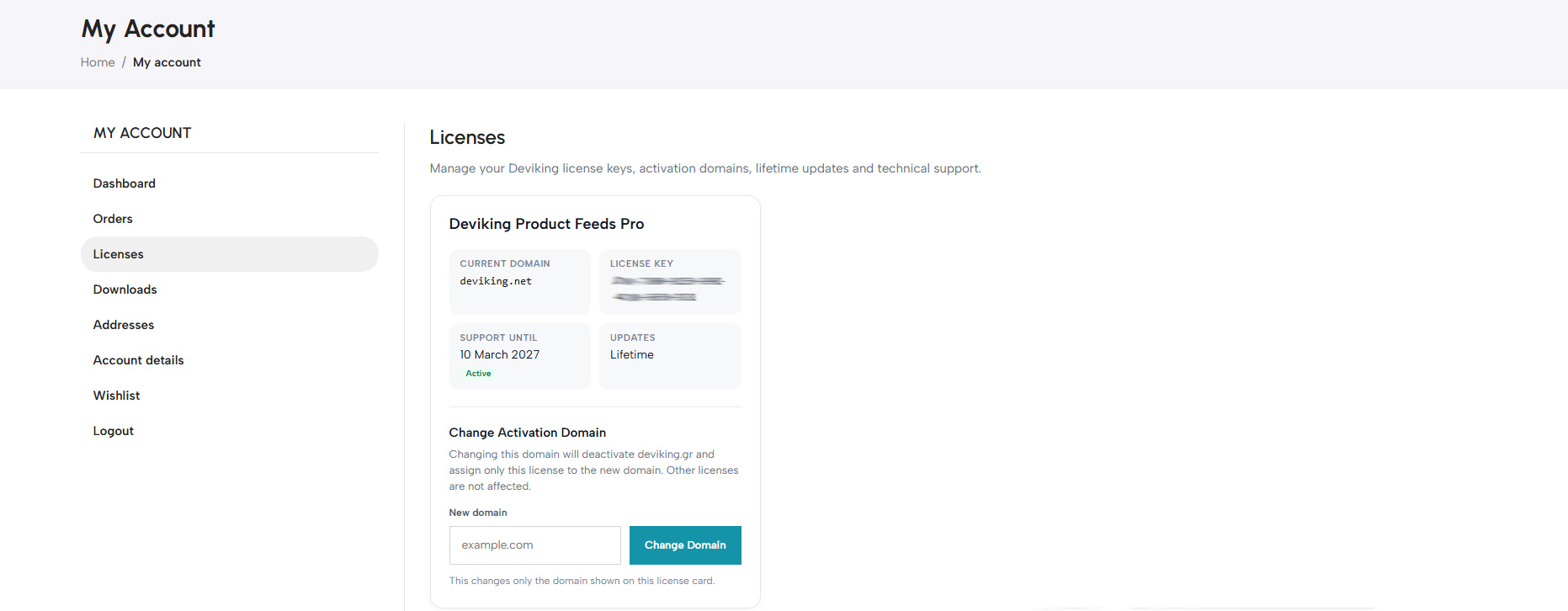
If you want to use the license on a different domain, you can change the licensed domain yourself from your Deviking account.
Open your Deviking customer account and locate the license you want to modify.
Use the:
Change Activation Domain
option and enter the new domain.
For example:
old-domain.comcan be changed to:
new-domain.comAfter the domain is changed:
- previous activations for the old domain are deactivated;
- the license becomes associated with the new domain;
- the same license key continues to be used;
- your support entitlement remains unchanged;
- your update entitlement remains unchanged.
You do not need to purchase a new license simply because your website domain changes.
Multiple Licenses
If you purchased multiple licenses or multiple activation domains, each license can be managed independently.
Changing the activation domain of one license does not affect your other licenses.
Moving a Website
When moving your website to another domain, the recommended process is:
- Deactivate the license on the old installation.
- Open your Deviking account.
- Use Change Activation Domain for the relevant license.
- Enter the new domain.
- Install Deviking Product Feeds Pro on the new website.
Go to:
Deviking Feeds → License
- Activate the same license key.
If You No Longer Have Access to the Old Website
You can still change the Activation Domain from your Deviking account.
Changing the domain automatically invalidates the previous domain activation, so access to the old WordPress installation is not required.
License Deactivated
After deactivation, you can view the current license status from:
Deviking Feeds → License
When you are ready to use the license again, activate it on an eligible domain using the same license key.